Fitness UI reference board
Layered screen slots
A single grid page for base screens, sub screens, and repeating UI variation layers. Every frame links back to the screen reference and exposes the replacement asset path.
Base
Layer 1 — Base screens
Canonical home screens and sub screens. Existing catalog captures fill what is already available; everything else stays as a waiting frame.
Home
Today / Home
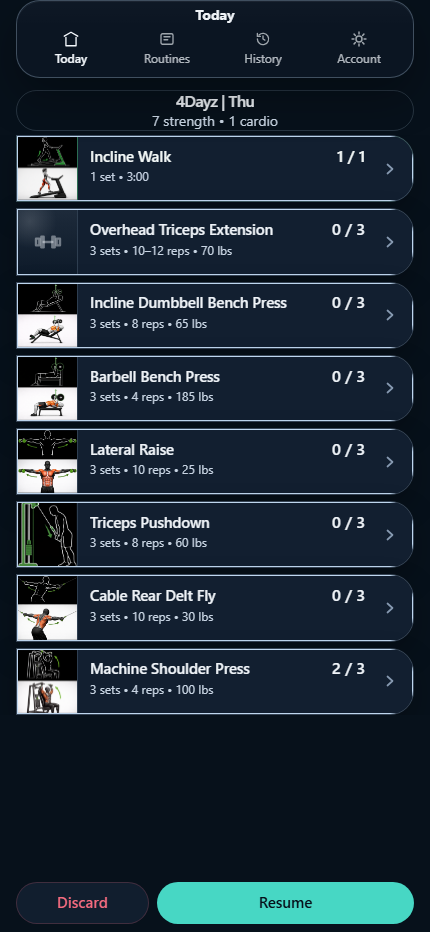
ref: /dev/mobile-regression?scenario=today-default
asset: /apps/fitness/screenshots/today-dashboard.png
frame: fitness.layer-01.today.base
Workout
Active Session
Waiting frame
Drop in a screenshot at the path below.
ref: /dev/mobile-regression?scenario=active-workout-session
asset: /apps/fitness/screen-board/layer-01/active-session-base.png
frame: fitness.layer-01.session.base
Routine
Routines / Current
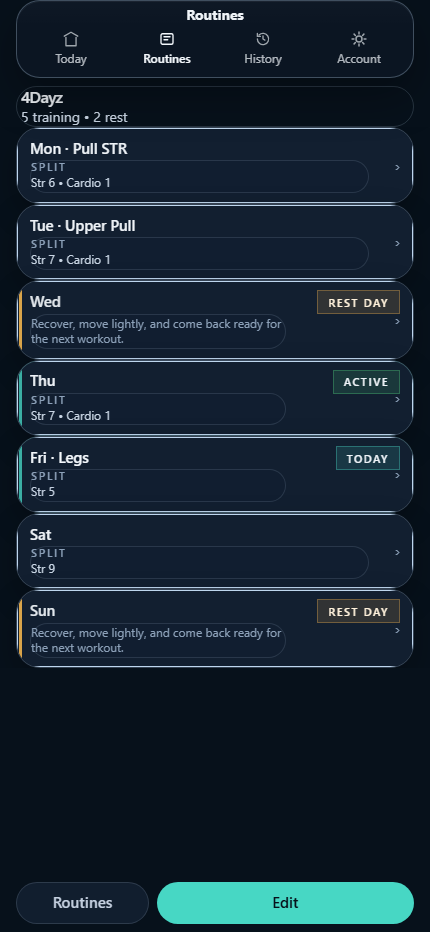
ref: /dev/mobile-regression?scenario=routines-current-view
asset: /apps/fitness/screenshots/routine-planner.png
frame: fitness.layer-01.routines.base
Routine
Routine Library
Waiting frame
Drop in a screenshot at the path below.
ref: /dev/mobile-regression?scenario=routines-list-view
asset: /apps/fitness/screen-board/layer-01/routine-library-base.png
frame: fitness.layer-01.routineList.base
Routine
Create Routine
Waiting frame
Drop in a screenshot at the path below.
ref: /dev/mobile-regression?scenario=create-routine
asset: /apps/fitness/screen-board/layer-01/create-routine-base.png
frame: fitness.layer-01.createRoutine.base
Routine
Edit Routine
Waiting frame
Drop in a screenshot at the path below.
ref: /dev/mobile-regression?scenario=edit-routine
asset: /apps/fitness/screen-board/layer-01/edit-routine-base.png
frame: fitness.layer-01.editRoutine.base
Routine
Routine Day Plan
Waiting frame
Drop in a screenshot at the path below.
ref: /dev/mobile-regression?scenario=view-day
asset: /apps/fitness/screen-board/layer-01/routine-day-plan-base.png
frame: fitness.layer-01.dayPlan.base
Routine
Routine Day Editor
Waiting frame
Drop in a screenshot at the path below.
ref: /dev/mobile-regression?scenario=edit-day-default
asset: /apps/fitness/screen-board/layer-01/routine-day-editor-base.png
frame: fitness.layer-01.dayEditor.base
Routine
Add Exercise Picker
Waiting frame
Drop in a screenshot at the path below.
ref: /dev/mobile-regression?scenario=add-exercise-default
asset: /apps/fitness/screen-board/layer-01/add-exercise-picker-base.png
frame: fitness.layer-01.addExercise.base
History
History / Sessions
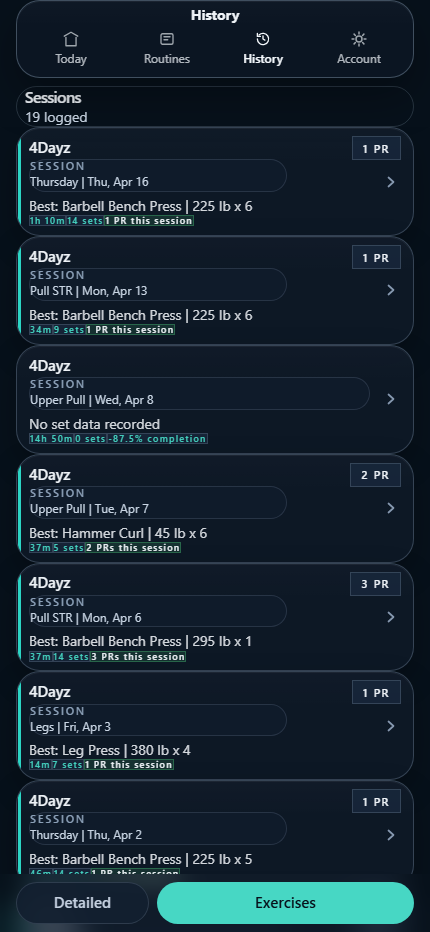
ref: /dev/mobile-regression?scenario=history-sessions-detailed
asset: /apps/fitness/screenshots/session-history.png
frame: fitness.layer-01.historySessions.base
History
History / Detail
Waiting frame
Drop in a screenshot at the path below.
ref: /dev/mobile-regression?scenario=history-detail-broken-images
asset: /apps/fitness/screen-board/layer-01/history-detail-base.png
frame: fitness.layer-01.historyDetail.base
History
Exercise History
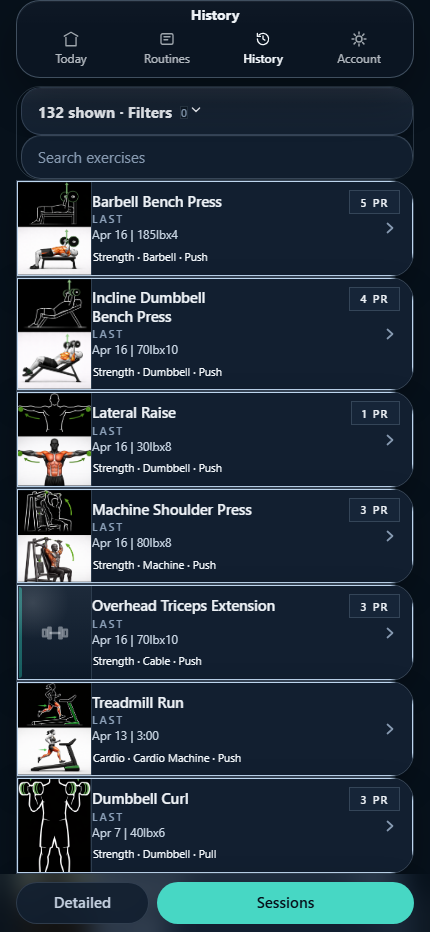
ref: /dev/mobile-regression?scenario=history-exercises-detailed
asset: /apps/fitness/screenshots/exercise-history.png
frame: fitness.layer-01.historyExercises.base
History
Exercise Detail
Waiting frame
Drop in a screenshot at the path below.
ref: /dev/mobile-regression?scenario=exercise-detail-strength
asset: /apps/fitness/screen-board/layer-01/exercise-detail-base.png
frame: fitness.layer-01.exerciseDetail.base
Account
Settings
Waiting frame
Drop in a screenshot at the path below.
ref: /settings
asset: /apps/fitness/screen-board/layer-01/settings-base.png
frame: fitness.layer-01.settings.base
Account
Login / Auth
Waiting frame
Drop in a screenshot at the path below.
ref: /login
asset: /apps/fitness/screen-board/layer-01/login-auth-base.png
frame: fitness.layer-01.login.base
Iteration 01
Layer 2 — Iteration 01 variations
Same screen map as Layer 1, reserved for the next UI pass. Replace each frame image without changing the screen reference.
Home
Today / Home
Waiting frame
Drop in a screenshot at the path below.
ref: /dev/mobile-regression?scenario=today-default
asset: /apps/fitness/screen-board/layer-02/today-home-v01.png
frame: fitness.layer-02.today.v01
Workout
Active Session
Waiting frame
Drop in a screenshot at the path below.
ref: /dev/mobile-regression?scenario=active-workout-session
asset: /apps/fitness/screen-board/layer-02/active-session-v01.png
frame: fitness.layer-02.session.v01
Routine
Routines / Current
Waiting frame
Drop in a screenshot at the path below.
ref: /dev/mobile-regression?scenario=routines-current-view
asset: /apps/fitness/screen-board/layer-02/routines-current-v01.png
frame: fitness.layer-02.routines.v01
Routine
Routine Library
Waiting frame
Drop in a screenshot at the path below.
ref: /dev/mobile-regression?scenario=routines-list-view
asset: /apps/fitness/screen-board/layer-02/routine-library-v01.png
frame: fitness.layer-02.routineList.v01
Routine
Create Routine
Waiting frame
Drop in a screenshot at the path below.
ref: /dev/mobile-regression?scenario=create-routine
asset: /apps/fitness/screen-board/layer-02/create-routine-v01.png
frame: fitness.layer-02.createRoutine.v01
Routine
Edit Routine
Waiting frame
Drop in a screenshot at the path below.
ref: /dev/mobile-regression?scenario=edit-routine
asset: /apps/fitness/screen-board/layer-02/edit-routine-v01.png
frame: fitness.layer-02.editRoutine.v01
Routine
Routine Day Plan
Waiting frame
Drop in a screenshot at the path below.
ref: /dev/mobile-regression?scenario=view-day
asset: /apps/fitness/screen-board/layer-02/routine-day-plan-v01.png
frame: fitness.layer-02.dayPlan.v01
Routine
Routine Day Editor
Waiting frame
Drop in a screenshot at the path below.
ref: /dev/mobile-regression?scenario=edit-day-default
asset: /apps/fitness/screen-board/layer-02/routine-day-editor-v01.png
frame: fitness.layer-02.dayEditor.v01
Routine
Add Exercise Picker
Waiting frame
Drop in a screenshot at the path below.
ref: /dev/mobile-regression?scenario=add-exercise-default
asset: /apps/fitness/screen-board/layer-02/add-exercise-picker-v01.png
frame: fitness.layer-02.addExercise.v01
History
History / Sessions
Waiting frame
Drop in a screenshot at the path below.
ref: /dev/mobile-regression?scenario=history-sessions-detailed
asset: /apps/fitness/screen-board/layer-02/history-sessions-v01.png
frame: fitness.layer-02.historySessions.v01
History
History / Detail
Waiting frame
Drop in a screenshot at the path below.
ref: /dev/mobile-regression?scenario=history-detail-broken-images
asset: /apps/fitness/screen-board/layer-02/history-detail-v01.png
frame: fitness.layer-02.historyDetail.v01
History
Exercise History
Waiting frame
Drop in a screenshot at the path below.
ref: /dev/mobile-regression?scenario=history-exercises-detailed
asset: /apps/fitness/screen-board/layer-02/exercise-history-v01.png
frame: fitness.layer-02.historyExercises.v01
History
Exercise Detail
Waiting frame
Drop in a screenshot at the path below.
ref: /dev/mobile-regression?scenario=exercise-detail-strength
asset: /apps/fitness/screen-board/layer-02/exercise-detail-v01.png
frame: fitness.layer-02.exerciseDetail.v01
Account
Settings
Waiting frame
Drop in a screenshot at the path below.
ref: /settings
asset: /apps/fitness/screen-board/layer-02/settings-v01.png
frame: fitness.layer-02.settings.v01
Account
Login / Auth
Waiting frame
Drop in a screenshot at the path below.
ref: /login
asset: /apps/fitness/screen-board/layer-02/login-auth-v01.png
frame: fitness.layer-02.login.v01
Iteration 02
Layer 3 — Iteration 02 variations
Same screen map as Layer 1, reserved for the next UI pass. Replace each frame image without changing the screen reference.
Home
Today / Home
Waiting frame
Drop in a screenshot at the path below.
ref: /dev/mobile-regression?scenario=today-default
asset: /apps/fitness/screen-board/layer-03/today-home-v02.png
frame: fitness.layer-03.today.v02
Workout
Active Session
Waiting frame
Drop in a screenshot at the path below.
ref: /dev/mobile-regression?scenario=active-workout-session
asset: /apps/fitness/screen-board/layer-03/active-session-v02.png
frame: fitness.layer-03.session.v02
Routine
Routines / Current
Waiting frame
Drop in a screenshot at the path below.
ref: /dev/mobile-regression?scenario=routines-current-view
asset: /apps/fitness/screen-board/layer-03/routines-current-v02.png
frame: fitness.layer-03.routines.v02
Routine
Routine Library
Waiting frame
Drop in a screenshot at the path below.
ref: /dev/mobile-regression?scenario=routines-list-view
asset: /apps/fitness/screen-board/layer-03/routine-library-v02.png
frame: fitness.layer-03.routineList.v02
Routine
Create Routine
Waiting frame
Drop in a screenshot at the path below.
ref: /dev/mobile-regression?scenario=create-routine
asset: /apps/fitness/screen-board/layer-03/create-routine-v02.png
frame: fitness.layer-03.createRoutine.v02
Routine
Edit Routine
Waiting frame
Drop in a screenshot at the path below.
ref: /dev/mobile-regression?scenario=edit-routine
asset: /apps/fitness/screen-board/layer-03/edit-routine-v02.png
frame: fitness.layer-03.editRoutine.v02
Routine
Routine Day Plan
Waiting frame
Drop in a screenshot at the path below.
ref: /dev/mobile-regression?scenario=view-day
asset: /apps/fitness/screen-board/layer-03/routine-day-plan-v02.png
frame: fitness.layer-03.dayPlan.v02
Routine
Routine Day Editor
Waiting frame
Drop in a screenshot at the path below.
ref: /dev/mobile-regression?scenario=edit-day-default
asset: /apps/fitness/screen-board/layer-03/routine-day-editor-v02.png
frame: fitness.layer-03.dayEditor.v02
Routine
Add Exercise Picker
Waiting frame
Drop in a screenshot at the path below.
ref: /dev/mobile-regression?scenario=add-exercise-default
asset: /apps/fitness/screen-board/layer-03/add-exercise-picker-v02.png
frame: fitness.layer-03.addExercise.v02
History
History / Sessions
Waiting frame
Drop in a screenshot at the path below.
ref: /dev/mobile-regression?scenario=history-sessions-detailed
asset: /apps/fitness/screen-board/layer-03/history-sessions-v02.png
frame: fitness.layer-03.historySessions.v02
History
History / Detail
Waiting frame
Drop in a screenshot at the path below.
ref: /dev/mobile-regression?scenario=history-detail-broken-images
asset: /apps/fitness/screen-board/layer-03/history-detail-v02.png
frame: fitness.layer-03.historyDetail.v02
History
Exercise History
Waiting frame
Drop in a screenshot at the path below.
ref: /dev/mobile-regression?scenario=history-exercises-detailed
asset: /apps/fitness/screen-board/layer-03/exercise-history-v02.png
frame: fitness.layer-03.historyExercises.v02
History
Exercise Detail
Waiting frame
Drop in a screenshot at the path below.
ref: /dev/mobile-regression?scenario=exercise-detail-strength
asset: /apps/fitness/screen-board/layer-03/exercise-detail-v02.png
frame: fitness.layer-03.exerciseDetail.v02
Account
Settings
Waiting frame
Drop in a screenshot at the path below.
ref: /settings
asset: /apps/fitness/screen-board/layer-03/settings-v02.png
frame: fitness.layer-03.settings.v02
Account
Login / Auth
Waiting frame
Drop in a screenshot at the path below.
ref: /login
asset: /apps/fitness/screen-board/layer-03/login-auth-v02.png
frame: fitness.layer-03.login.v02